Advanced Waveform Utility

Carriers > Mixing Settings

This tab is displayed when you add more than one carrier.

Carrier Repeat Mode

SCPI Command

[:SOURce]:RADio:AWU:WAVeform:CCARrier:MIXing:REPeat:MODE AUTO|MANual

[:SOURce]:RADio:AWU:WAVeform:CCARrier:MIXing:REPeat:MODE?

SCPI Example


Notes

This setting is used to set the carrier length rule when combining waveforms. See Length Adjustment.

Preset

AUTO

State Saved

Yes

Sample Rate Mode

SCPI Command

[:SOURce]:RADio:AWU:WAVeform:SRATe:MODE AUTO|MANual

[:SOURce]:RADio:AWU:WAVeform:SRATe:MODE?

SCPI Example


Preset

AUTO

State Saved

Yes

Sample Rate

Displays the sample rate of waveform. See Waveform Sample Rate.

If Waveform has only one carrier, this value will be coupled with original sample rate of imported waveform file and Resampling Ratio applied on imported waveform file.

If there are more than one carrier, this value is determined by the combination of imported waveforms.

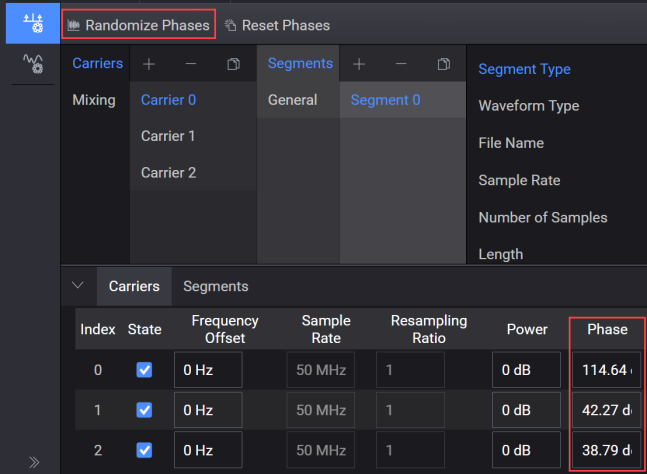
Randomize Phases

Assigns random values to the initial phase of every carrier.

ClosedSee image.

SCPI Command

[:SOURce]:RADio:AWU:WAVeform:RANDomize:PHASe

SCPI Example


State Saved

Yes

Initial S/W Revision

A.19.03

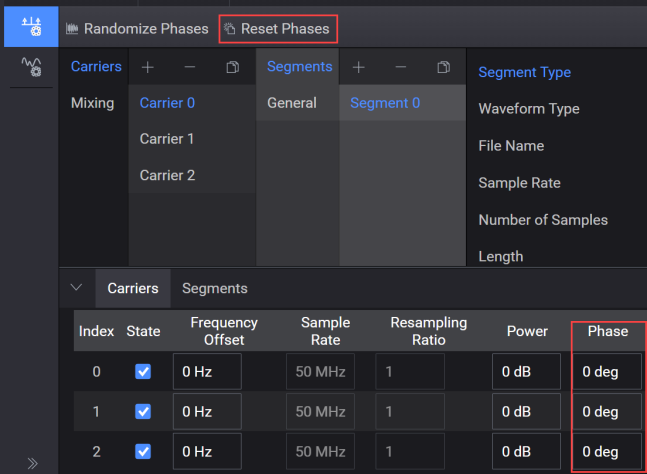
Reset Phases

Resets the initial phase of every carrier to zero value.

ClosedSee image.

SCPI Command

[:SOURce]:RADio:AWU:WAVeform:RESet:PHASe

SCPI Example


State Saved

Yes

Initial S/W Revision

A.19.03